Java OOP – Java Swing Applications (Layout Manager)
September 1, 2020 1 min read

The mechanism of arranging swing controls by adding controls to a container is called layout manager. There are following classes that represents the layout managers:
- java.awt.BorderLayout
- java.awt.FlowLayout
- java.awt.GridLayout
- java.awt.CardLayout
- java.awt.GridBagLayout
- javax.swing.BoxLayout
- javax.swing.GroupLayout
- javax.swing.ScrollPaneLayout
- javax.swing.SpringLayout etc.
- Visit our previous articles Introduction of Swing applications and Java Containers and Event handling for further more details.
BorderLayout
The BorderLayout is used to arrange the components in five regions: north, south, east, west and center. Each region (area) may contain one component only. Let’s see an example on borderlayout.
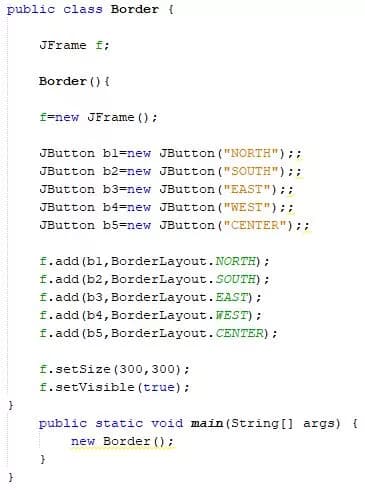
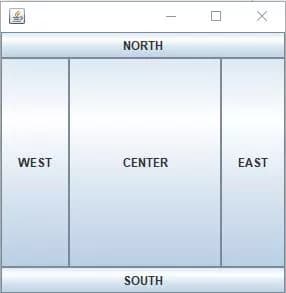
Here the default constructor creates a border layout but with no gaps between the components. JBorderLayout(int hgap, int vgap) creates a border layout with the given horizontal and vertical gaps between the components.
FlowLayout
The FlowLayout is used to arrange the components in a line, one after another (in a flow). It is the default layout of applet or panel. Let’s see an example on Flowlayout.
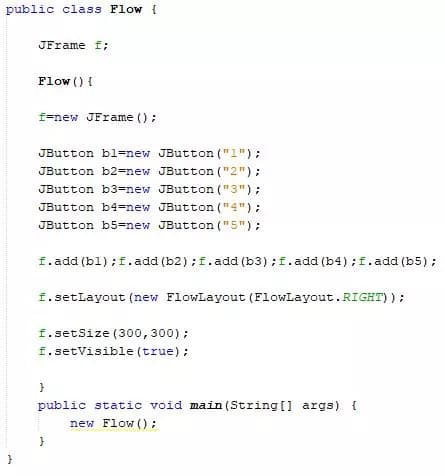
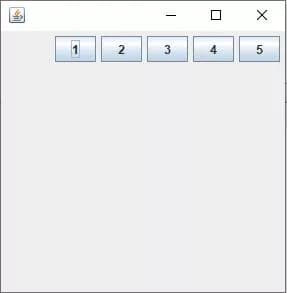
Here default constructor creates a flow layout with centered alignment and a default 5 unit horizontal and vertical gap. FlowLayout(int alignment) creates a flow layout with the given alignment and a default 5 unit horizontal and vertical gap.
GridLayout
The GridLayout is used to arrange the components in rectangular grid. One component is displayed in each rectangle. Let’s see an example on grid layout.
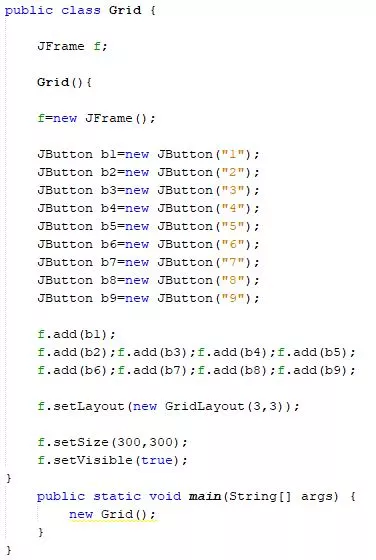
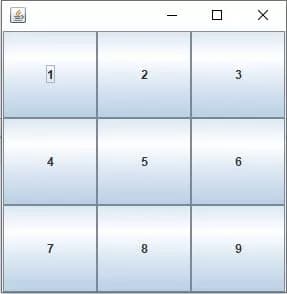
Here default constructor creates a grid layout with one column per component in a row. GridLayout(int rows, int columns) creates a grid layout with the given rows and columns but no gaps between the components.
Let’s meet with the last article of Java OOP on the topic Garbage Collection. See you guys.
Thank you.