Part 3 – Data and Information, Keyboard inputs
July 15, 2020 2 min read
Hello guys, welcome back to my tutorial. In the 2nd article we discussed about basic computer literals and computer variables.
Today we are going to learn about the differences between data and information first. And after that we will learn about keyboard inputs.
Let’s begin.
As an Example, in addition of 2 values we can divide the method in to 2 different ways.
- Arithmetic addition
100 + 200 = 300
Int x=10 , int y = 20, x + y = 30
- String concat
“100” + “200” = 100200
100 + “200” = 100200
Let’s see some examples of codes.
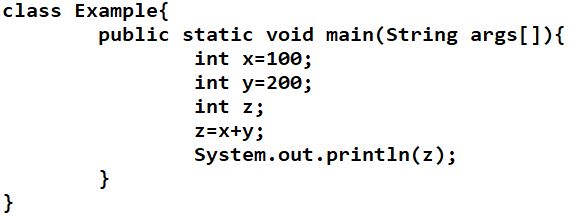
Here is a simple code that says 100 is the value for variable x and 200 is the value for variable y. And there is no value assigned for variable z. But in next line the addition of the values of x and y is assigned to the z. And then the value of z is printed. The answer 300 will be printed in the command prompt. Try the code.

Let’s see the next code.
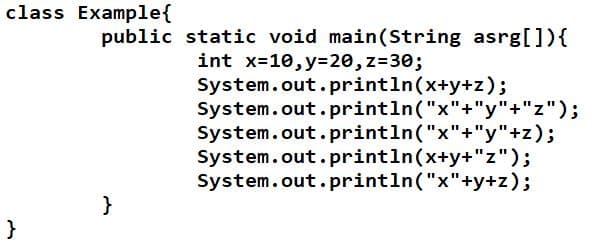
In the above code 10, 20, 30 are assigned to the x, y, z. And in the first command of the print line says to print the value for the addition of the values. There it will print 60 as the output. But in the next line says to print String concat of x, y and z. Because of that it will not print the addition in the command prompt. It will print as”xyz”. Try the code and see the output of next lines. Then you will properly understand.
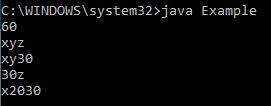
Let’s go to the next topic “keyboard inputs“.
For keyboard inputs in a code, we use “Scanner input= new Scanner(System.in);” . Because we use that line of code, we should import it from the util package from java. Therefore you should write the code as shown below.
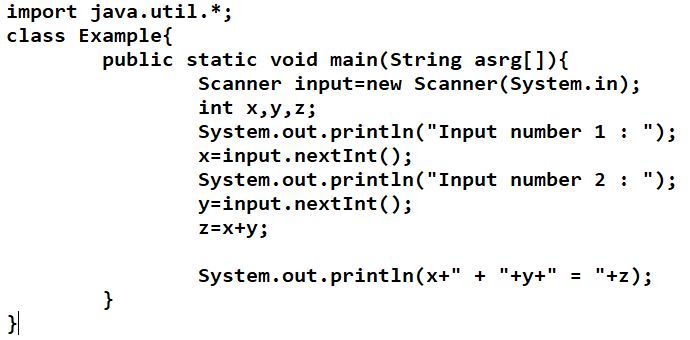
Here you can see the Scanner line and input means the variable. Don’t get confuse about the line. You will understand the meaning of that line from the future tutorials. You should write the import line before making the class as shown in the above code.
x = input.nextInt(); —-> line says you can input any value when running the code in command prompt. Same thing is happening for the variable y also.
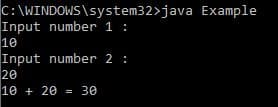
Try to think the answer for the below code before you try to run the code.
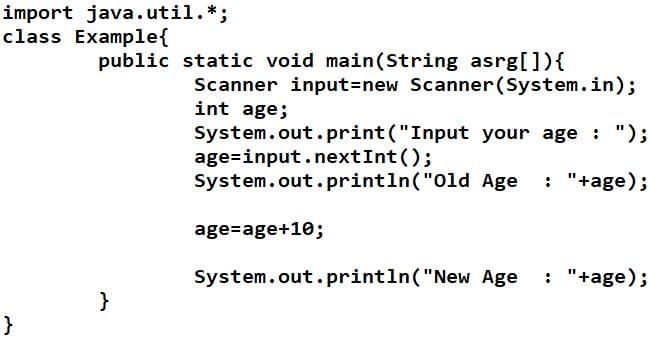
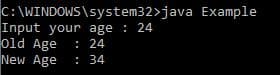
Hope you got better understand about the keyboard inputs and as well as difference of data and information.
In the next article let’s discuss about the java define data types.
Thank you.