Part 2 – Computer data/literals, Computer variables
July 14, 2020 2 min read
Hi guys, in previous session we discussed about how to download and install java JDK. Today i’m going to discuss about basic computer data/literals and computer variables and how to use them in a code.
First let’s see what are the computer data/literals.
Computer literals are notations that represent a fixed value in source code. Basically there are 6 computer literals.
- Integers
Eg: 100, 200, -12, 100100
- Floating points
Eg: 1.23, -1.001, 0.0012, 6.023E23
- Characters
Eg: ‘A’, ‘Q’, ‘5’
- Strings
Eg: “John”, “B”, “Number”
- Logical data
Eg: true, false
- Special characters
Eg: ‘\b’ -> backspace
‘\n’ -> newline/enter key
‘\t’ -> tab
Let’s go to the topic computer variables. There you can learn how to use computer literals in a program.
Below given code shows a simple program. Look at it carefully.
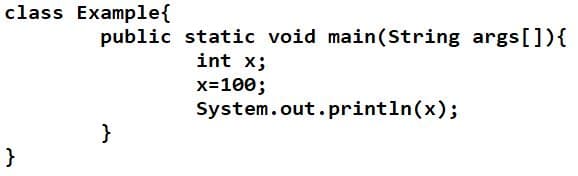
If you want to try this code, I recommend the Geany software. Or if you want you can use any other software. Just write this code and save it as Example.java which the class name is “Example”.
Don’t get confuse about the 2nd line that is written in the code above. Just focus on the next 3 lines. There “int” means the Integer(data type) and the “x” means the variable. When you need to print any of the value on command prompt, you should initialize the variable with a data type and assign the value to the variable as shown in the 4th line. Be careful, without initializing the variable you will get an error. Then the 5th line indicate to print the value in command prompt. Compile and run the program. You will see 100 is printed.
Let’s go to the next code.
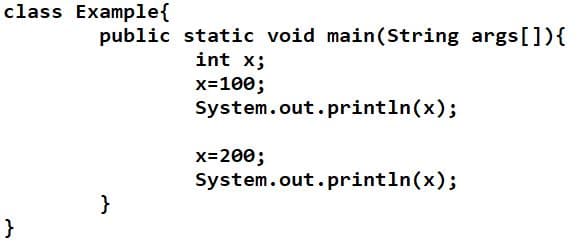
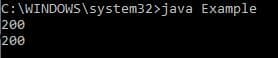
Here, the first 5 lines are same as the previous code. But in next line you can see 200 is assigned to the variable “x”. Therefore when you compile and run the program you can see 100 and 200 both printed as the output. It is happened because according to the 4th and 5th lines after you assigned the value to the variable “x” there is a command to print and again in the 6th and 7th lines same procedure has gone. Look at the answer.
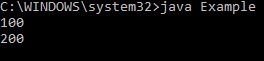
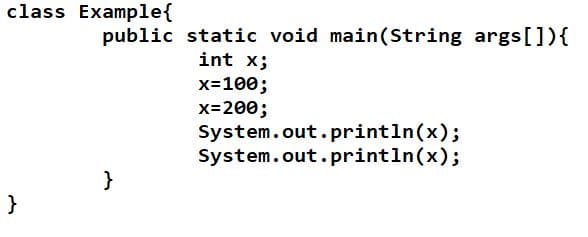
But here first 100 is assigned to “x” and again 200 is assigned without the command to print in between those 2 lines. Therefore x get the final value as 200 and print 200, 2 times as the output. Try to get the output by compiling and running the code.
Try different codes by changing the values. You will get more knowledge by then.
Hope you guys got the knowledge about literals and the variables. See you in the next article with the comparison of data and information and also about keyboard inputs.
Thank you.