Redux Saga Setup and Use
May 31, 2022 4 min read

Redux Saga? and why??
Redux Saga is a middleware that we can use to interact with and access outside resources asynchronously. The simple use cases for the saga library are trying to call an API request, access the Brower storage / Async storage and perform I/O operations.
How It works?
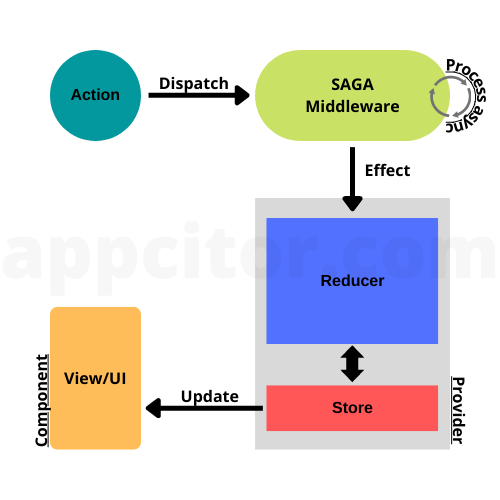
It’s easy to understand the flow with the above flow diagram.
We already know the redux flow inside an application. But in this case, saga middleware will apply between the action and the reducer. It will process the async functions, and after that, it will call the reducer functions with the relevant types. Other than that, this flow is not different from the traditional redux flow.
How to setup?
We all know this is a redux middleware, so first of all we need to install redux. using below command you can easily install redux.
# If you use npm:
npm install redux

# Or if you use Yarn:
yarn add redux
In this example application, I’m creating an react app so we need to install react redux also,
# If you use npm:
npm install react-redux

# Or if you use Yarn:
yarn add react-redux
Now we can install redux saga.
# If you use npm:
npm install redux-saga

# Or if you use Yarn:
yarn add redux-saga
In this article, I’m not explaining how to configure the redux store and how to use react-redux. I’ll divide the files of this application. It will make it easy to understand the concept of the saga.
In our sample application, we try to retrieve users from an API.
Let’s start.
1.Make the actions
export const getUsers = () => {
    return {
        type: 'FETCH_USERS_PENDING'
    }
}

export default getUsers
2.Make the reducers
const initialState = {
    loading: false,
    data: null,
    error: null
}

const users = (state = initialState, action) => {
    switch (action.type) {
        case 'FETCH_USERS_PENDING':
            return {
                ...state,
                loading: true
            }
        case 'FETCH_USERS_FULFILLED':
            return {
                ...state,
                loading: false,
                data: action.payload,
                error: null
            }
        case 'FETCH_USERS_REJECTED':
            return {
                ...state,
                loading: false,
                error: action.payload
            }
        default:
            return state
    }
}

export default users
3.Additionally, we can make a root reducer for future use
import { combineReducers } from "redux";
import userReducer from "../reducers/users";
const rootReducer = combineReducers({
    users: userReducer,
})

export default rootReducer;
4.Let’s make the users saga
import { call, put, takeEvery } from 'redux-saga/effects';

// generator function
function* getUser(action) {
    try {
        // call the api and get data from it
        const response = yield call(fetch, 'https://jsonplaceholder.typicode.com/users');
        const data = yield response.json();
        // call the reducer success action with data
        yield put({ type: 'FETCH_USERS_FULFILLED', payload: data });
    } catch (error) {
        // call if the api fails to get data
        yield put({ type: 'FETCH_USERS_REJECTED', payload: error.message });
    }
}

function* userWatcher() {
    // takeEvery waits for every action
    // this will watching if the action type is FETCH_USERS_PENDING
    // and then call the getUser generator function
    yield takeEvery('FETCH_USERS_PENDING', getUser);
}

export default userWatcher;
5.Additionally, we can make a root saga for future use
import { all } from 'redux-saga/effects';
import userWatcher from './users';

export default function* rootSaga() {
    yield all([
        userWatcher(),
        // if we have more sagas we can call the like above saga
    ]);
}
6.Let’s make the redux store with saga middleware
import { createStore, applyMiddleware } from "redux";
import createSagaMiddleWare from "redux-saga";
import rootReducer from './reducers/root-reducer';
import rootSaga from "./saga/root-saga"

const sagaMiddleWare = createSagaMiddleWare();
const midlleware = [sagaMiddleWare];

const store = createStore(rootReducer, applyMiddleware(...midlleware));

sagaMiddleWare.run(rootSaga);

export default store;
7.Last but not least, let’s make the UI that we need to trigger the action
import React, { useEffect } from 'react'
import { useSelector, useDispatch } from 'react-redux'
import getUsers from '../actions/users'

const Home = () => {
    const dispatch = useDispatch()
    const users = useSelector((state) => state.users)
    useEffect(() => {
        dispatch(getUsers())
    }, [])

    return (
        <div>
            {users.loading && <div>Loading...</div>}
            {users.data && <div>
                <ul>
                    {users.data.map(user => <li key={user.id}>{user.name}</li>)}
                </ul>
            </div>}
            {users.error && <div>{users.error}</div>}
        </div>
    )
}

export default Home
8.When we plan to go with react-redux, we need to wrap our components with the Provider. That’s why I didn’t mention it before. Don’t forget.
import React from 'react';
import ReactDOM from 'react-dom/client';
import Home from './app/ui';
import { Provider } from "react-redux";
import store from "./app/store";

const root = ReactDOM.createRoot(document.getElementById('root'));
root.render(
  <Provider store={store}>
    <Home />
  </Provider>
);
Finally, we are done with the first example of the redux. I hope you get a little idea about redux-saga. In the future, I’ll add another one or two articles with complex applications and give you an idea about saga properties.
Thank you all 😊
References: