Structural – Decorator Design Pattern
July 31, 2020 2 min read

Decorator Pattern is a structural design pattern. If we want to add behaviors during the runtime for an object, we can use decorator pattern. In other words, we can extend the functionalities of the structure of program without changing the structure.
Let’s discuss about the decorator design pattern using an example in java.
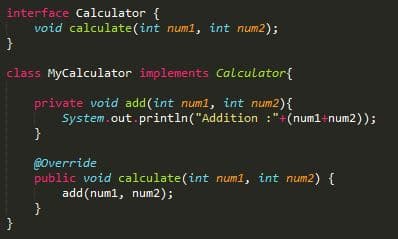
Here I made a interface called “Calculator” to create the method “calculate()”. After that I made class called “MyCalculator” by implementing the interface “Calculator” to override the method inside it. Before that I made a parameterized method called “add()” to call inside the overridden method. But from methods we can only do the addition from the calculator. So to add another function I am going to create a decorator class.
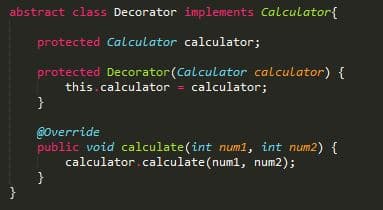
This is an abstract class that implements the “Calculator” class. I this class I made a constructor by giving the parameter an object from the “Calculator” class. Then I called the method “calculate()” inside the overridden method. But from that we can only do the addition function. We can’t make objects from the decorator class as it is an abstract class. Therefore I will make another class called “MultiplyDeco” by extending the decorator class.
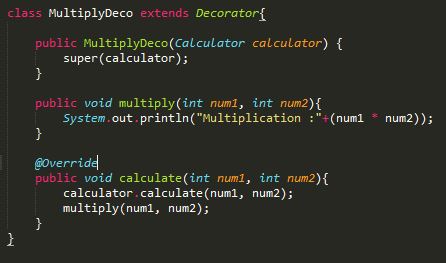
Here also happening the same procedure from the constructor comparing to the constructor of the decorator class as I called the super constructor here. Next I created a method called “multiply()” to add the multiplication function to the calculator. Inside the overridden method I called the “calculate()” and also the “multiply()” methods. From this the functions addition and multiplication will run at the same time. Let’s see what will do inside the main method.
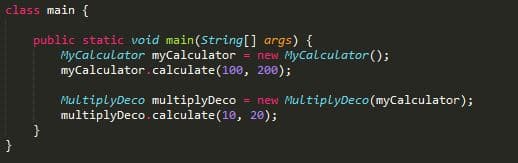
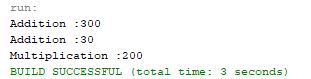
In the main method we can see from the “MyCalculator” object reference I called the “calculate()” method by giving 2 values. From that method calling it will print only 300 because addition is the only function we made inside the “MyCalculator” class. Therefore 2 print both addition and multiplication functions I made the object from the wrapper class “MultiplyDeco” and I gave the argument as the “MyCalculator” object reference. And then by calling the “calculate()” we can run the both functions. The output will be as given below.
You can visit the below given articles to learn about creational design patterns.
Thank you.
Creational Design Patterns